Eric Bergman-Terrell's Blog
Camera Traps
A "camera trap" is just a camera that automatically captures images of animals. While camera traps are a wonderful, non-invasive way to photograph wildlife, they tend to capture hundreds or thousands of images that don't contain any animals. Often the effects of wind will be misconstrued as animals moving in front of the lens.
Manually filtering through so many images can be a total waste of time!
MegaDetector for the Win!
Microsoft's MegaDetector is an AI model that identifies animals, people, and vehicles in camera trap images. It's perfect for reviewing camera trap images and finding the ones that are probably images of animals.
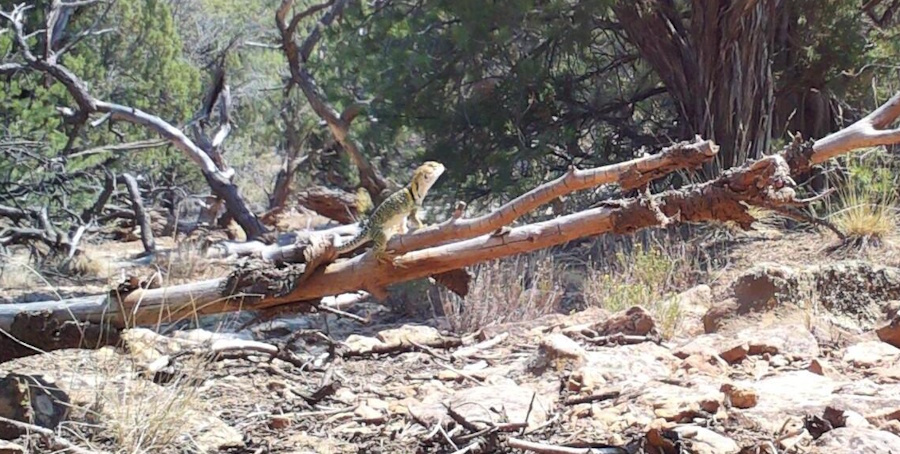
Eastern Collared Lizard (Crotaphytus collaris) a.k.a. "mountain boomer" captured by my camera trap, and found by MegaDetector
My camera trap is just a Raspberry Pi 3B+ with an inexpensive camera, powered by an Anker power pack. It's disguised as a mis-delivered package. The app just snaps a picture every minute. Because the camera is mounted upside-down, it automatically corrects the images with this transform:
transform=Transform(hflip=True, vflip=True)
I previously tried triggering the camera with motion detection hardware. I used an "HC-SR501 PIR Infrared Sensor". This device resulted in way too many false positives and false negatives. It had a problem with direct sunlight and electrical interference. Also, because it's triggered by body heat, it didn't detect the beautiful reptiles that prowl around Southwestern Colorado.
Some Raspberry Pi-based camera traps do the image analysis and classification in the device itself. While that is frankly amazing, I prefer to conserve the camera trap's battery. After my camera trap has amassed a day's worth of photos, I download them to a flash drive, and use my PC to find the animal photos with MegaDetector.
Note: you'll need to change the latitude and longitude values in the camera trap program to match your location. The arguments to the dms_to_decimal function are the degrees, minutes, and seconds of latitude or longitude:
latitude  =  dms_to_decimal( 37, 00, 00)  # Positive N of equator,   Negative S
longitude = -dms_to_decimal(108, 00, 00)  # Positive E of Greenwich, Negative W
Camera Trap Program for Raspberry Pi 3B+:
import sys
import os
import logging
import logging.config
from datetime import datetime, time
from pathlib import Path
import datetime
from pysunnoaa import noaa
from picamera2 import Picamera2
from libcamera import Transform


def dms_to_decimal(degrees, minutes, seconds):
    return degrees + minutes / 60.0 + seconds / 3600.0


latitude  =  dms_to_decimal( 37, 00, 00)  # Positive N of equator,   Negative S
longitude = -dms_to_decimal(108, 00, 00)  # Positive E of Greenwich, Negative W

logger = None

photo_quality = 90

photo_width = 1920
photo_height = 1080

# Amount of time before sunrise and after sunset to continue taking pictures.
daylight_margin = datetime.timedelta(minutes=30)

photos_folder = "/home/eric/Documents/image_capture/photos"

# Take a photo every photo_interval seconds
photo_interval = 60 * 1


def setup_logging():
    global logger

    logging.basicConfig(
        level=logging.INFO,
        format="%(asctime)s - %(name)s - %(levelname)s - %(message)s",
        handlers=[
            logging.FileHandler('log.log'),  # Write logs to a file
            logging.StreamHandler()  # Print logs to the console
        ]
    )

    logger = logging.getLogger(__name__)


def is_daytime():
    def get_utc_offset_hours():
        local_now = datetime.datetime.now().astimezone()
        offset_timedelta = local_now.utcoffset()
        utc_offset_hours = offset_timedelta.total_seconds() / 3600

        return utc_offset_hours

    now = datetime.datetime.now()

    utc_offset_hours = get_utc_offset_hours()

    sunrise = noaa.sunrise(latitude, longitude, utc_offset_hours, now)
    sunset = noaa.sunset(latitude, longitude, utc_offset_hours, now)

    begin = sunrise - daylight_margin
    end = sunset + daylight_margin

    result = begin <= now <= end

    logger.info(f'is_daytime: sunrise: {sunrise}, sunset: {sunset} now: {now}')
    logger.info(f'daylight_margin: {daylight_margin} begin: {begin} end: {end} result: {result}')

    return result


def take_photo(photos_path):
    def get_photo_filename():
        now = datetime.datetime.now()
        return f'{now.year:04}{now.month:02}{now.day:02}_{now.hour:02}{now.minute:02}{now.second:02}.jpg'

    photo_file_path = f'{photos_path}{os.path.sep}{get_photo_filename()}'

    logger.info(f'taking photograph "{photo_file_path}"')

    with Picamera2() as cam:
        try:
            # The transform compensates for the camera being upside-down.
            config = cam.create_still_configuration({"size": (photo_width, photo_height)},
                                                    transform=Transform(hflip=True, vflip=True))

            cam.configure(config)
            cam.options['quality'] = photo_quality

            cam.start()
            sys.modules['time'].sleep(2)  # Give the sensor time to adjust to light levels

            cam.capture_file(photo_file_path)

            cam.stop()
            logger.info(f'Photo captured. size: {os.stat(photo_file_path).st_size:,} bytes')
        except Exception as ex:
            logger.info(f'Exception: {ex}')


def main():
    global logger

    setup_logging()

    logger.info(f'photo_interval: {photo_interval}')

    photos_path = Path(photos_folder)

    logger.info(f'photos_path: "{photos_path}"')

    if not photos_path.is_dir():
        photos_path.mkdir()

    while True:
        try:
            if is_daytime():
                take_photo(photos_path)

            sys.modules['time'].sleep(photo_interval)
        except Exception as ex:
            logger.exception('Exception', ex)


if __name__ == '__main__':
    main()
You will want to run the above script from a shell that won't be shut down. I recommend "tmux" for this purpose:
With tmux, run the script as follows (assuming it's named "main.py"):
tmux new
sudo python main.py
Here's the script I use to go through a set of photos to find the interesting ones:
Note: MegaDetector does not currently run on the latest version of Python. I use Python 3.12.
Note: I only use MegaDetector to determine if there may be animals in a photo. I do not use it to further classify the animals. I have not found the classification to be very accurate, at least for the denizens of my back yard.
Photo Filtering Program for PC:
import os
import shutil
import time
from pathlib import Path
from PytorchWildlife.models import detection as pw_detection
import logging
import logging.config
from PIL import Image, ImageDraw
import pickle
import numpy as np
import numpy.typing as npt
from typing import Any

logger: logging.Logger

# https://github.com/microsoft/MegaDetector

# Requires python version <= 3.12.

# Models
#
# MDV6-yolov9-c, MDV6-yolov9-e, MDV6-yolov10-c, MDV6-yolov10-e, MDV6-rtdetr-c

model_version: str = 'MDV6-yolov10-e'

detection_threshold: float = 0.70

highlight_rectangle_width: int = 4
highlight_rectangle_color: str = 'red'

items_to_find: set[str] = {'animal', 'person', 'vehicle'}

# Approximation factor for spurious rectangle detection. Increasing value makes filtering more aggressive.
approximation_factor: int = 20


def setup_logging(root_folder: Path) -> None:
    global logger

    logging.basicConfig(
        level=logging.INFO,
        format="%(asctime)s - %(name)s - %(levelname)s - %(message)s",
        handlers=[
            logging.FileHandler(root_folder.joinpath('log.log')),  # Write logs to a file
            logging.StreamHandler()  # Print logs to the console
        ]
    )

    logger = logging.getLogger(__name__)


def classify_images(photos_path: Path, output_path: Path) -> None:
    def item_detected(labels) -> bool:
        def is_item(label) -> bool:
            values = label.split(' ')

            return (values[0] in items_to_find) and float(values[1]) >= detection_threshold

        return any(is_item(label) for label in labels)

    def highlight_items(src_image_file_path: Path, dest_image_file_path: Path, detection_result: dict[Any, Any]) -> None:
        logger.info(
            f'highlight_items: src_image_file_path: "{src_image_file_path}" dest_image_file_path: "{dest_image_file_path}" detection_result: {detection_result}')

        img = Image.open(src_image_file_path)
        draw = ImageDraw.Draw(img)

        for detection in detection_result["detections"]:
            rect = detection[0]
            draw.rectangle((max(0, rect[0] - highlight_rectangle_width), max(0, rect[1] - highlight_rectangle_width), min(img.width, rect[2] + highlight_rectangle_width), min(img.height, rect[3] + highlight_rectangle_width)), outline=highlight_rectangle_color, width=highlight_rectangle_width)

        img.save(dest_image_file_path)

    start_time = time.perf_counter()

    model = pw_detection.MegaDetectorV6(None, 'cpu', True, model_version)

    photos_processed: int = 0

    for photo_path in [f for f in photos_path.rglob("*") if f.is_file()]:
        detection_result: dict[Any, Any] = model.single_image_detection(os.path.abspath(photo_path))

        if item_detected(detection_result["labels"]):
            logger.info(f'ANIMAL: "{photo_path}": {detection_result}\n"{photo_path}"')

            dest_image_file_path: Path = Path(output_path, os.path.basename(photo_path))

            text_file_path: Path = Path(output_path, os.path.basename(photo_path)).with_suffix('.txt')
            with open(text_file_path, "w", encoding="utf-8") as text_file:
                text_file.write(f'{detection_result}')

            binary_file_path: Path = Path(output_path, os.path.basename(photo_path)).with_suffix('.bin')
            with open(binary_file_path, "wb") as binary_file:
                pickle.dump(detection_result, binary_file)

            highlight_items(photo_path, dest_image_file_path, detection_result)

            photos_processed += 1

    logger.info(f'Processed {photos_processed} Elapsed Time: {(time.perf_counter() - start_time):,.2f} s')


def approximate_array(array: npt.NDArray[np.float64]) -> npt.NDArray[np.int_]:
    approx_list = []

    for index, value in np.ndenumerate(array):
        approx_list.append(int(value // approximation_factor))

    return np.array(approx_list)


def process_rectangles(output_path: Path) -> dict[str, Any]:
    rectangles: dict[str, Any] = {}

    for info_file in [f for f in output_path.rglob("*.bin") if f.is_file()]:
        print(f'INFO: {info_file}')

        # Save every rectangle that exceeded the threshold in memory, but save an approximated value so that similar
        # rectangles are considered identical.
        with open(info_file, "rb") as input_file:
            content = input_file.read()

            data = pickle.loads(content)
            print(f'data: {data}')

            for index, value in enumerate(data['detections']):
                print(f'index: {index}, value: {value}')

                # Why are these arrays, when the detections are already in an array?
                if len(data['detections'][index].confidence) != 1 or len(data['detections'][index].xyxy) != 1:
                    raise Exception('unexpected array length')

                confidence = data['detections'][index].confidence
                xyxy = approximate_array(data['detections'][index].xyxy)

                if confidence[0] >= detection_threshold:
                    key: str = str(xyxy)

                    if not(key in rectangles):
                        rectangles[key] = { 'data': xyxy, 'count': 1 }
                    else:
                        rectangles[key]['count'] += 1

    return rectangles


def delete_spurious_images(output_path, spurious_path, rectangles: dict[str, Any]) -> None:
    spurious_files: list[Path] = []

    for info_file in [f for f in output_path.rglob("*.bin") if f.is_file()]:
        print(f'INFO: {info_file}')

        # Scale down every rectangle that exceeded the threshold in memory, and store it in memory. Scaling down
        # rectangles causes similar rectangles to have identical coordinates.
        with open(info_file, "rb") as input_file:
            content = input_file.read()

            data = pickle.loads(content)
            print(f'data: {data}')

            max_confidence: float = -1.0

            for index, value in enumerate(data['detections']):
                print(f'index: {index}, value: {value}')

                # Why are these arrays, when the detections are already in an array?
                if len(data['detections'][index].confidence) != 1 or len(data['detections'][index].xyxy) != 1:
                    raise Exception('unexpected array length')

                confidence = data['detections'][index].confidence
                xyxy = approximate_array(data['detections'][index].xyxy)

                # Ignore the photo if the rectangle is in multiple photos.
                if confidence >= detection_threshold and rectangles[str(xyxy)]['count'] == 1:
                    max_confidence = max(max_confidence, confidence)

            if max_confidence < detection_threshold:
                print(f'Delete {info_file}')

                wildcard = f'{Path(info_file).stem}.*'
                for file_path in output_path.glob(wildcard):
                    spurious_files.append(file_path)

    for file_path in spurious_files:
        shutil.move(file_path, spurious_path)


def invert_images(folder_path) -> None:
    print('invert_images')

    for file_path in [f for f in folder_path.rglob("*") if f.is_file()]:
        print(f'{file_path}')

        img = Image.open(file_path)

        flipped = img.transpose(Image.Transpose.FLIP_TOP_BOTTOM)
        flipped.save(file_path)


def main():
    root_folder = Path('I:\\temp\\animals\\2026-09-12')

    setup_logging(root_folder)

    logger.info(f'model_version:       "{model_version}"')
    logger.info(f'detection_threshold: {detection_threshold:.2f}\n')

    photos_path = Path(root_folder, 'photos')
    output_path = Path(root_folder, 'output')
    spurious_path = Path(root_folder, 'spurious')

    logger.info(f'photos_path:   "{photos_path}"')
    logger.info(f'output_path:   "{output_path}"')
    logger.info(f'spurious_path: "{spurious_path}"\n')

    try:
        shutil.rmtree(output_path, True)
        output_path.mkdir()

        shutil.rmtree(spurious_path, True)
        spurious_path.mkdir()

        classify_images(photos_path, output_path)

        file_count = sum(1 for item in output_path.iterdir() if item.is_file()) // 3
        logger.info(f'\n***** After running model, {file_count:,} photos were identified as containing animals, people, or vehicles *****\n')

        rectangles = process_rectangles(output_path)
        delete_spurious_images(output_path, spurious_path, rectangles)

        file_count = sum(1 for item in output_path.iterdir() if item.is_file()) // 3

        logger.info(f'\n***** After removing photos with repeated rectangles, {file_count:,} photos were identified as containing animals, people, or vehicles *****')
    except Exception as ex:
        logger.exception(f'Fatal Error', ex)


if __name__ == '__main__':
    main()
There's a risk that the MegaDetector model will mis-identify the same region in multiple photographs. For example, I've left my camera trap running for hours, only to find the same rectangle mis-identified as an animal, in many, many photographs.
To mitigate this risk, consider the rectangles in the detection_result values returned by MegaDetector in the "classify_images" function.
Handling Mis-Identifications
When a detection_result has one or more rectangles with a high confidence, the app stores all such rectangles in memory. After all photos have been processed, if multiple photos have the same high-confidence rectangle, they are all considered spurious and are copied to the "spurious" folder. I figure that an actual animal will not appear in almost exactly the same region in multiple photographs, as they tend to move around from minute to minute.
When the model mis-identifies a given rectangle in multiple photographs, the rectangles are often very similar but not identical. Their coordinates may differ by a few pixels. To ensure that similar rectangles are treated as the same rectangle, the app divides each rectangle's coordinates by the "approximation_factor" value. This division effectively scales down the rectangle. When rectangles are scaled down, similar rectangles will tend to have identical coordinates.
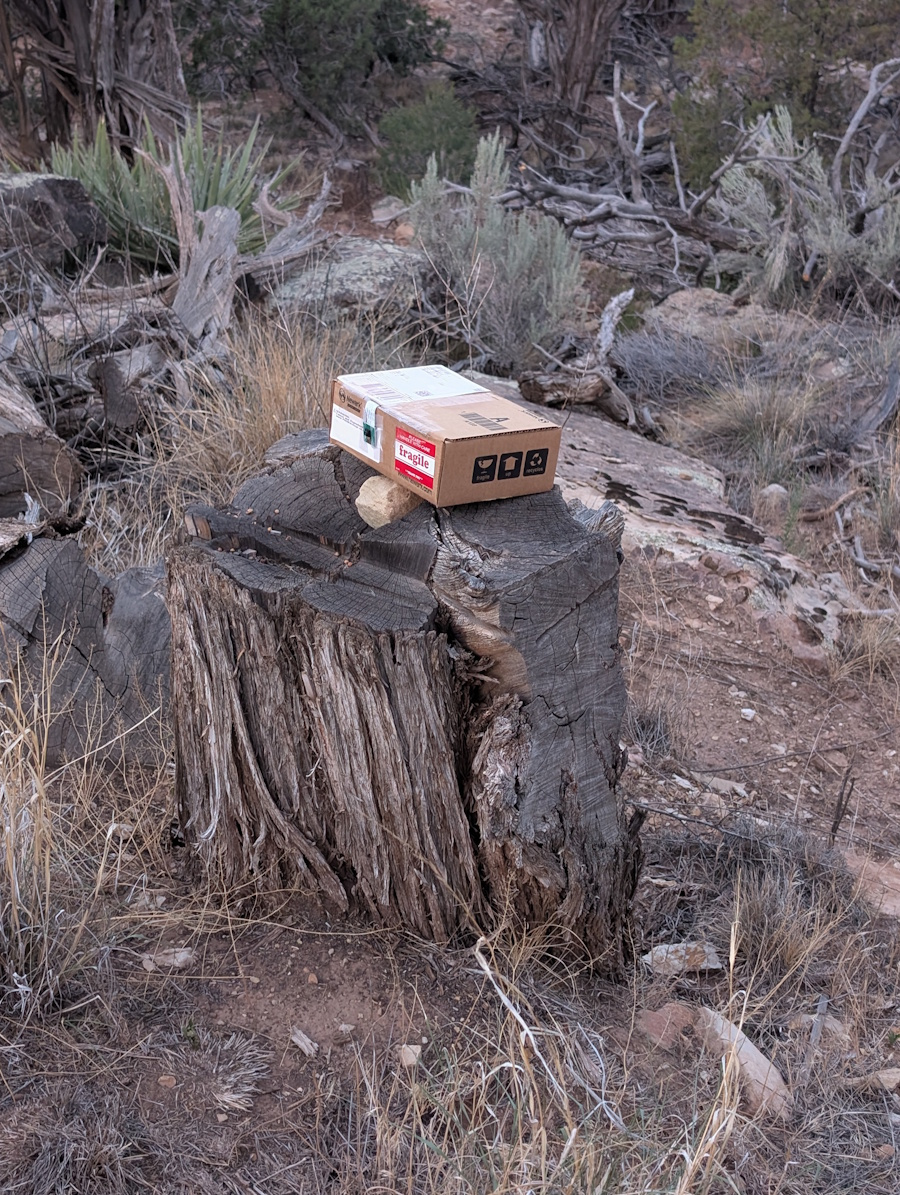
Raspberry Pi Camera Trap
Reader Comments
Comment on this Blog PostRecent Posts
| Title | Date |
| Raspberry Pi Camera Trap and Animal Detection Program | August 29, 2026 |
| Python Tip: Fix Incorrect Orientation of Digital Photos | August 8, 2026 |
| EBT Weather is now available for Windows and Linux | May 30, 2026 |
| Node.js + Express: How to Block Requests by User-Agent Headers | January 7, 2026 |
| Vault 3 is Now Available for Windows on ARM Machines! | December 13, 2025 |
| Vault 3: How to Include Outline Text in Exported Photos | October 26, 2025 |
| .NET Public-Key (Asymmetric) Cryptography Demo | July 20, 2025 |