Eric Bergman-Terrell's Blog
My main computer is a notebook running Windows 7. The notebook connects to a docking station via USB 2. The docking station has a wired, Fast Ethernet connection (100 Mbit/s). Additionally I have a Wireless G WiFi connection (54 MBit/s). Finally, I have an Ethernet cable that provides a Gigabit Ethernet connection (1 Gbit/s) which I usually don't bother to connect, because the docking station's Fast Ethernet connection is fast enough most of the time.
However, when I backup my NAS drive, I need the fastest network connection available, so I plug in the Gigabit Ethernet cable. After noticing that the backups were running slower than expected, I opened the Windows Task Manager and selected the Network tab. I was surprised to find that the docking station's Fast Ethernet connection was being used, instead of the much faster Gigabit connection.
Windows 7 is supposed to give priority to the fastest network connection, but sometimes it gets it wrong, as happened to me. Here's how to fix this issue:
- Go to the Network and Sharing Center (Control Panel / Network and Internet / Network and Sharing Center).
- Click the "Change adapter settings" link.
- For each network connection, right-click the connection and select Properties
- Click Internet Protocol Version 4 (TCP/IPv4) (or v6 if you're on IPv6).
- Click Properties, then click Advanced...
- Make sure the Automatic metric checkbox is cleared.
- Enter a unique number, inversely proportional to the connection's speed, in the Interface metric textbox. In other words, enter 1 for your fastest connection, 2 for your next fastest connection, and so on.
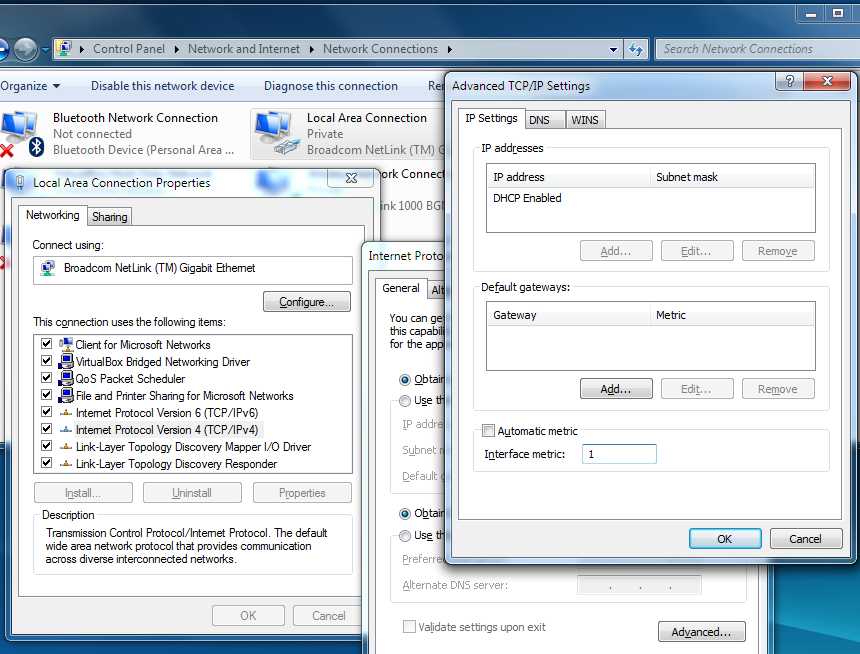
Now go to the Windows Task Manager's Network tab and verify that Windows 7 is using your fastest connection in preference to the slower ones:
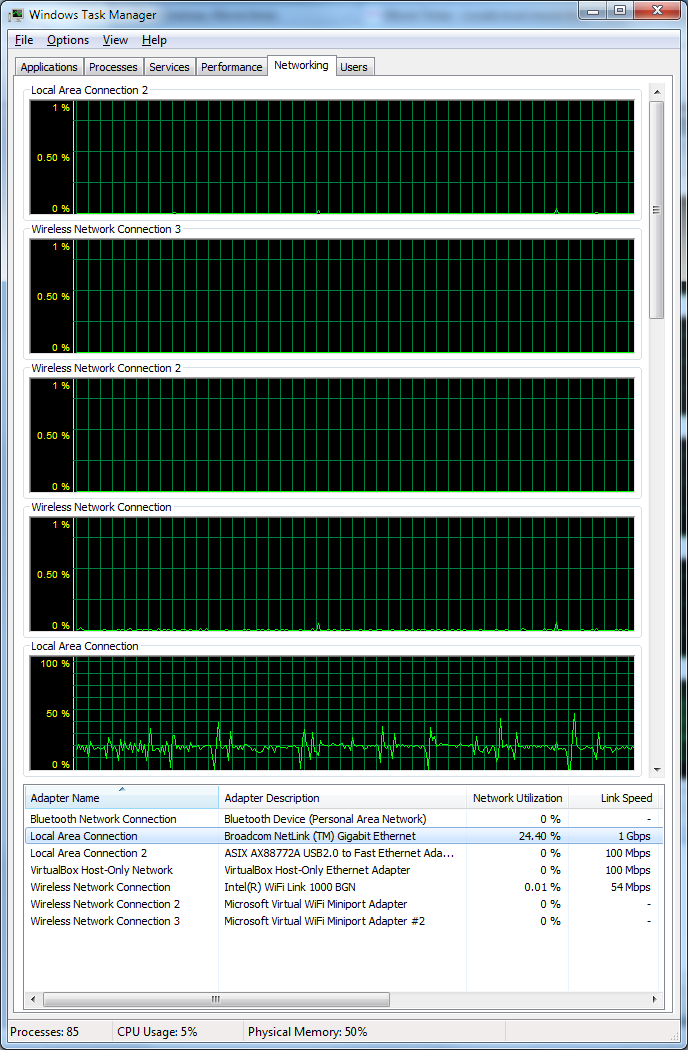

I have the need for speed!
Reader Comments
Comment on this Blog PostRecent Posts
| Title | Date |
| Raspberry Pi Camera Trap and Animal Detection Program | August 29, 2026 |
| Python Tip: Fix Incorrect Orientation of Digital Photos | August 8, 2026 |
| EBT Weather is now available for Windows and Linux | May 30, 2026 |
| Node.js + Express: How to Block Requests by User-Agent Headers | January 7, 2026 |
| Vault 3 is Now Available for Windows on ARM Machines! | December 13, 2025 |
| Vault 3: How to Include Outline Text in Exported Photos | October 26, 2025 |
| .NET Public-Key (Asymmetric) Cryptography Demo | July 20, 2025 |