Eric Bergman-Terrell's Blog
For years I used Microsoft SourceSafe to manage my personal source code. But when I converted my development machine to Windows 7 I started experiencing issues with SourceSafe.
I've replaced SourceSafe with Subversion and I'm very happy with it. I use Visual SVN Server Standard Edition as my Subversion server on my Windows 7 development machine. I use the TortoiseSVN svn client on all of my Windows development machines.
For my Eclipse development I probably should be using the integrated svn client, but I am not, only because TortoiseSVN works so well. Ditto for my Visual Studio work, integrated SVN clients exist, but I'm sticking with TortoiseSVN for now.
When I backup my SVN repository, I backup my svn repository folder, as well as a folder containing the latest versions of all my source code. Here is a fragment of my PowerShell backup script that extracts the source code to a folder. You will need to replace {PROTOCOL}, {MACHINE NAME}, {REPOSITORY PATH} {USERNAME}, and {PASSWORD} with values appropriate to your environment. My PowerShell script uses the CollabNet Subversion Command-Line Client (for Windows).
...
function CopySourceCodeToTempFolder($SourceCodeFolder, $LogFile)
{
Write-Output "Copying source code to temporary folder"
Write-Output ""

Write-Output "Getting source code from Subversion"
Write-Output ""

& 'C:\Program Files (x86)\CollabNet Subversion Client\svn.exe' export {PROTOCOL}://{MACHINE NAME}{REPOSITORY PATH} $SourceCodeFolder --username {USERNAME} --password {PASSWORD}

Write-Output ""
}
...
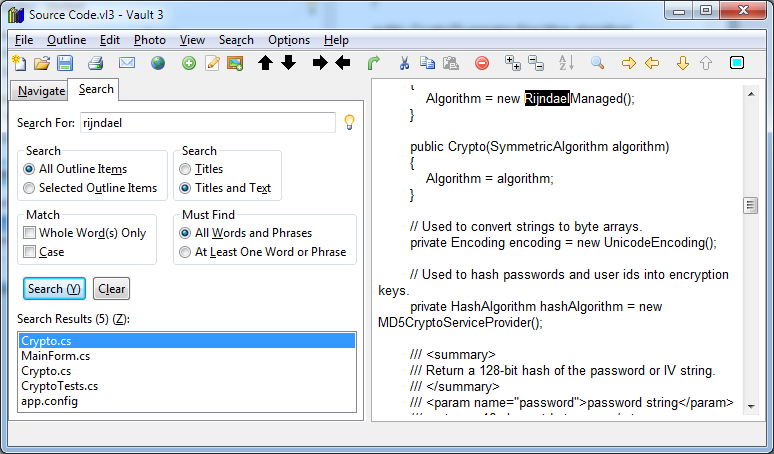
When I'm at work, I often need to find snippets of code. Consequently I import all of my source code into a Vault 3 file stored in my DropBox folder. That way I can find a useful fragment of code in a matter of seconds. I use Vault 3's "File / Import / Import Text Files and/or Photos from Disk Folder" menu to create a Vault 3 file of my entire personal source code repository. Vault 3 uses strong encryption, so I don't need to worry about the fact that there are passwords in some of the configuration files that I import to Vault 3.
Reader Comments
Comment on this Blog PostRecent Posts
| Title | Date |
| Raspberry Pi Camera Trap and Animal Detection Program | August 29, 2026 |
| Python Tip: Fix Incorrect Orientation of Digital Photos | August 8, 2026 |
| EBT Weather is now available for Windows and Linux | May 30, 2026 |
| Node.js + Express: How to Block Requests by User-Agent Headers | January 7, 2026 |
| Vault 3 is Now Available for Windows on ARM Machines! | December 13, 2025 |
| Vault 3: How to Include Outline Text in Exported Photos | October 26, 2025 |
| .NET Public-Key (Asymmetric) Cryptography Demo | July 20, 2025 |