Eric Bergman-Terrell's Blog
May 5, 2010
Key chords involving the Control (Ctrl) key stopped working for me in VirtualBox v. 3.1.6. In other words, the Control key was not getting sent on to the guest operating system. Consequently Ctrl+C, Ctrl+A, Ctrl+X, Ctrl+V, and so on, had no effect.
I was able to get the Control key to work again by selecting File / Preferences in VirtualBox, clicking the Input section, and changing the Host Key from Control to a different key (I chose F12).
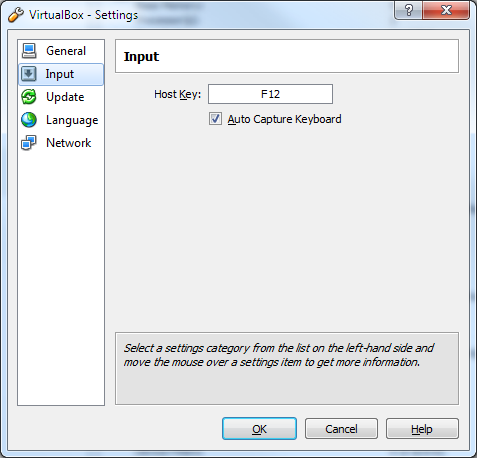
The Host Key is displayed on the bottom right of your VirtualBox screen, as the rightmost icon:

Reader Comments
Comment on this Blog PostRecent Posts
| Title | Date |
| Raspberry Pi Camera Trap and Animal Detection Program | August 29, 2026 |
| Python Tip: Fix Incorrect Orientation of Digital Photos | August 8, 2026 |
| EBT Weather is now available for Windows and Linux | May 30, 2026 |
| Node.js + Express: How to Block Requests by User-Agent Headers | January 7, 2026 |
| Vault 3 is Now Available for Windows on ARM Machines! | December 13, 2025 |
| Vault 3: How to Include Outline Text in Exported Photos | October 26, 2025 |
| .NET Public-Key (Asymmetric) Cryptography Demo | July 20, 2025 |