EBT Weather Installation
.NET Runtime
Both the Windows and Linux versions of EBT Weather require the .NET Desktop Runtime 10.0. Download it here.
Download and install the .NET Desktop Runtime 10.0 before installing EBT Weather.
Linux users may be able to install .NET Desktop Runtime 10.0 with the following commands:
sudo apt update
sudo apt install dotnet-runtime-10.0
Windows (Intel/AMD 64-bit)
- Download EBT Weather for Windows (Intel/AMD 64-bit).
- Unzip the .zip file that you downloaded.
- Run the EBT Weather Setup.exe program.
- When EBT Weather is running, right-click its icon in the taskbar and click "pin to taskbar".
Linux (Intel/AMD 64-bit, ARM 64-bit)
- EBT Weather requires the .NET Desktop Runtime 10.0. Download it here or use the above commands.
- Install the .NET 10 Desktop Runtime.
- Download EBT Weather for Linux (Intel/AMD 64-bit) or EBT Weather for Linux (ARM 64-bit)
- Unzip the .zip file that you downloaded.
- Create a launcher to the EBT Weather app using one of the commands below.
- When you create a launcher to the app, you can use the "app_icon.png" icon if your version of Linux allows you to specify an icon.
Launcher Command:
"{folder in which you installed EBT Weather}/EBTWeather"
or
dotnet "{folder in which you installed EBT Weather}/EBTWeather.dll"
For example, on my system I use this command:
"/home/eric/Apps/EBT Weather/linux-x64/EBTWeather"
I could also have used:
dotnet "/home/eric/Apps/EBT Weather/linux-x64/EBTWeather.dll"
Note: You may have to specify that the EBTWeather file has execute permission:
chmod +x EBTWeather
Launching Minimized
If you want the app to launch minimized, for example if it's launched as a Windows startup app, specify a --minimize argument in the shortcut or command line:
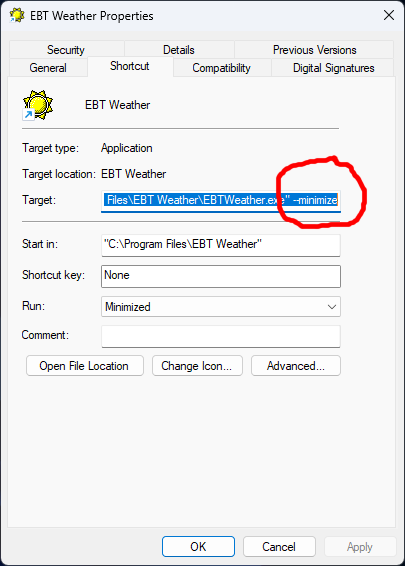
The --minimize argument works in Windows and Linux.